Notifications
0
across all projects
0
0% done
0
still to do
0
need attention
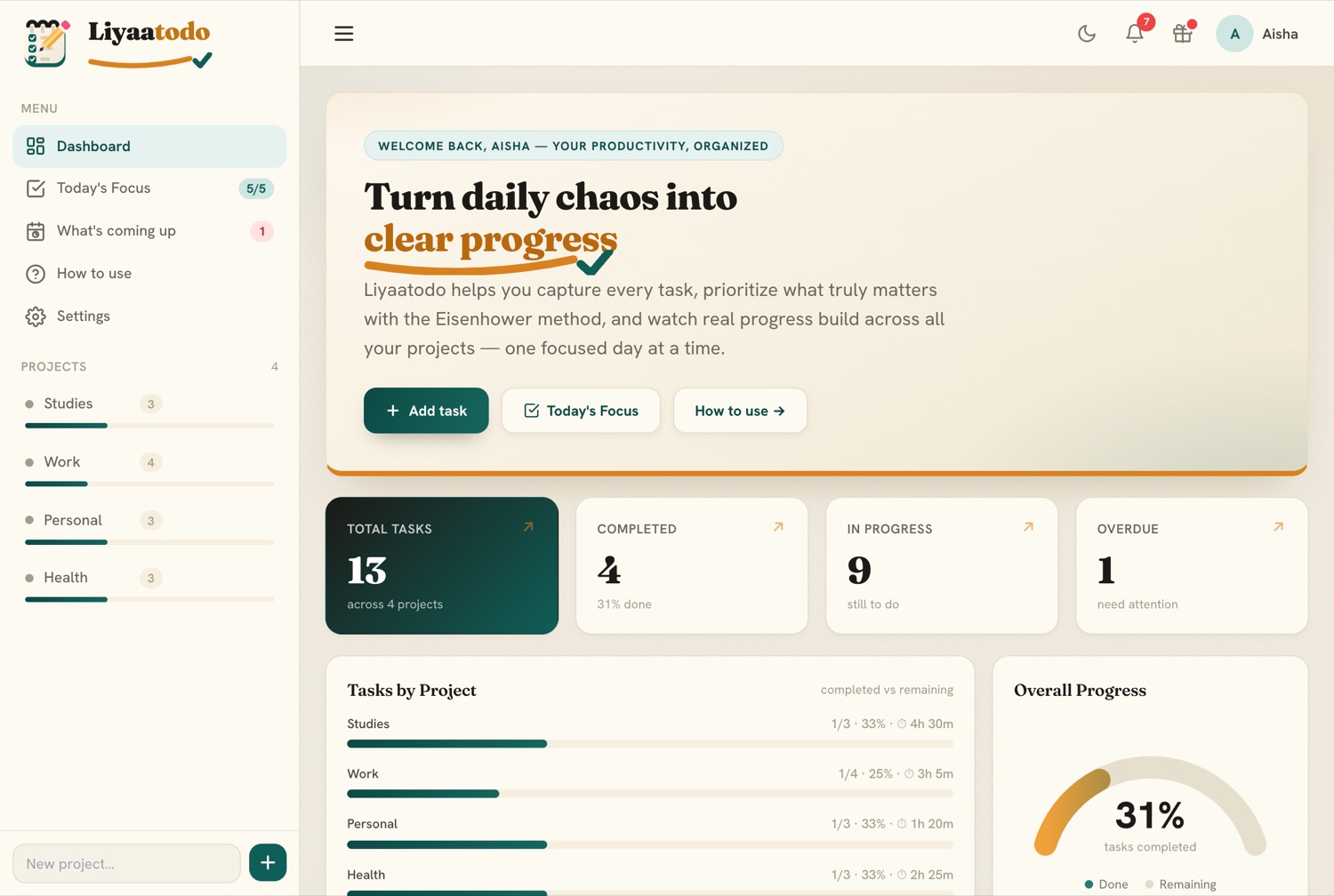
Tasks by Project
completed vs remainingOverall Progress
0%
tasks completed
Priority Breakdown
Focus Matrix
Eisenhower · what to act onYour Projects
tap to openToday's Focus
Pick up to 5 tasks you'll finish today — from any project.
--:--:--
—
Time left today
—
—
—
—
Today's Progress
Pick tasks to focus on
0 of 0 done today
Today's Tasks
0 / 5No tasks selected yet
Pick up to 5 tasks from any project to focus on today.
Tomorrow's Focus
Plan the day before — these become your Today's Focus tomorrow.
Plan ahead for a calmer morning
Pick up to 5 tasks to focus on tomorrow.
What's coming up
Every task with a deadline, across all your projects — soonest first.
No deadlines yet
Add a deadline to any task and it'll show up here, sorted by what's due next.
Weekly Planner
This week
General
Plan, prioritize, and accomplish your tasks with ease.
Daily Progress
Add a task to get started
0 of 0 tasks completed
No tasks yet
Create your first task to start tracking progress.
Quick tour
tap a card to try itCreate & organise projects
A project is a folder for related tasks — like Studies, Work, or Errands. Use the “New project…” box at the bottom of the left sidebar, type a name, and hit the + button. Hover a project to rename ✏️ it, reorder ▲▼ it, or delete it. Click its name to open it — or click the Liyaatodo logo any time to jump back to the Dashboard. The ☰ button in the top bar hides or shows the sidebar.
Add, label & edit tasks
Open a project and use the Add task form. Give it a title, a priority (High / Medium / Low), a deadline (defaults to one week out), an estimated time (30m, 2h, 1h30m…), and an optional label (like study or errand) to group similar tasks — click any label chip to filter by it. Tag a task ★ Important and ⚡ Urgent to power the matrix. Use Sort and the List / Matrix toggle, plus the search box, to find things fast. Hit the ✏️ pencil to edit any detail later, and tick the checkbox when it’s done.
Pick your “Today’s Focus”
Open Today’s Focus and choose up to 5 tasks you’ll finish today — pulled from any project (search to find them fast). Ticking one off here also completes it in its project. You get a live clock, a “time left today” bar, a custom day countdown (to an exam, trip or Eid), a fresh quote every few minutes, and a ⛶ Fullscreen focus mode. Each new day the list resets so you start fresh — finished tasks stay done in their projects.
See what’s coming up
The What’s coming up screen gathers every task that has a deadline from all your projects and lists them soonest first, grouped into Overdue, Due today, Tomorrow, Next 7 days and Later. Tick one to complete it, hit the ✏️ pencil to edit, or tap a row to jump to its project. The sidebar shows a red badge when anything’s overdue.
Watch your progress
The Dashboard is your command centre: total / completed / active / overdue counts, an overall completion gauge, a bar for every project (with its total estimated time), and a priority breakdown. The Focus Matrix here spells out exactly what’s important & urgent for you and lists those tasks — tap one to jump straight to its project. Everything updates live as you check tasks off.
Prioritise with the Matrix
Inside a project, switch from List to Matrix view to see the Eisenhower Matrix: four boxes — Do (important & urgent), Schedule, Delegate, and Delete. Drag a task into a box to set its importance/urgency. It’s the fastest way to decide what actually deserves your attention.
Make it yours
In Settings you can switch theme — warm Ink & Amber or cool Periwinkle — and the 🌙 / ☀️ button in the top bar flips dark / light. Add your own motivation quotes and manage the whole library, back up everything to a file (and import it back), reset the app cache, or erase data by scope. The 🔔 bell gives overdue and due-soon reminders (with optional browser notifications), and you can install Liyaatodo as an app for an offline, full-screen experience. The 🎁 What’s new button shows the latest changes.
Sign in to save & sync
Tap your avatar (top-right) → Account & sync → Continue with Google. Your Google profile picture appears in the top bar, everything saves to your account automatically, and it syncs across all your devices — finish a task on your phone and it’s updated on your laptop. Signed out, your data still saves in this browser.
Understanding the Eisenhower Matrix
the heart of prioritisingNamed after US President Dwight D. Eisenhower, this method sorts every task by two simple questions: Is it important? (does it move you toward your real goals?) and Is it urgent? (does it need attention right now?). Crossing those two answers gives four quadrants — and each one tells you exactly what to do. In Liyaatodo you set a task's ★ Important and ⚡ Urgent flags (or just drag it into a box in the project's Matrix view), and it lands in the right quadrant automatically.
Do these first, today. Crises and real deadlines — an assignment due tonight, a bill, something on fire. If it matters and the clock is ticking, it belongs here. Don't let this pile grow.
e.g. “Submit the report due tonight”, “Fix the broken booking page”.
Plan a time for these — this is where you grow. No deadline pressure yet, but they build your future: studying, skills, health, relationships. Give them a deadline so they don't slip into quadrant 1 as emergencies.
e.g. “Revise for next month's exam”, “Learn a new skill”, “Exercise”.
Delegate it, or knock it out fast. It feels pressing but doesn't really move your goals — interruptions, some emails and calls, busywork. Hand it off if you can, or batch it quickly so it doesn't eat your day.
e.g. “Reply to a routine email”, “Forward a request to the right person”.
Drop or defer these. Distractions and time-wasters that neither matter nor are urgent. Be honest — deleting them is what frees your time for quadrants 1 and 2.
e.g. “Mindless scrolling”, “Tasks that no longer serve a goal”.
- Labels group similar tasks — give tasks the same label, then click any label chip to filter by it.
- Sort a project’s tasks by priority, deadline, estimated time, name or newest, and use search to filter live.
- What’s coming up lists every deadline across all projects, soonest first — the sidebar badge turns red when something’s overdue.
- Pick your look in Settings → Appearance — Ink & Amber or Periwinkle — and flip dark / light with the 🌙 / ☀️ button.
- Today’s Focus resets every new day; it has a live clock, time-left bar, a custom day countdown, rotating quotes and a ⛶ Fullscreen mode.
- The 🔔 bell sends overdue & due-soon reminders (with optional browser notifications); “mark all read” clears them.
- Back up all your data to a file and import it back from Settings — handy when moving devices.
- Works offline, installs as an app, and (signed in) syncs across devices. The 🎁 What’s new button shows the latest updates.
Got feedback or a bug?
We'd love to hear it. Fill in our quick feedback form, or join our Telegram community to share ideas and get updates.
Settings
Manage your appearance, app, quotes and saved data.
Appearance
Theme
Pick the look that suits you. Use the ☀️ / 🌙 button in the top bar to switch light and dark.
Modules
Project management
Adds a Kanban Board & Timeline, milestones, dependencies and assignees to every project. Turn off any time for a simpler task list.
App
Install Liyaatodo as an app
Add it to your home screen / desktop for a full-screen, offline app experience.
Quotes management
Add a quote
Your quotes show on Today's Focus alongside the built-in ones, and sync to your account.
Your quote library
Every quote in your rotation — remove any, built-in or yours.
Data & storage
Backup & restore
Download a file with all your projects, tasks, quotes and settings — or restore everything from a backup file. Great for moving devices or keeping a safe copy.
Importing replaces your current data on this device (and syncs if signed in).
Data & cache
Reset app cache
Clears stored app files and reloads the latest version. Your tasks are kept.
Erase all data
Deletes all projects, tasks and settings on this device and in your cloud account (if signed in), then signs you out. This cannot be undone.